Showing posts with label tutorial. Show all posts

Friday, July 1, 2011

Set up Mail For Exchange with a Google account / Gmail

This time I will provide information on how to set up Mail For Exchange on symbian phone with a google account. actually very easy to focus on the understanding that if you follow the steps, the following information directly to the official site.

Official site

Tuesday, June 21, 2011

install skins TTpod


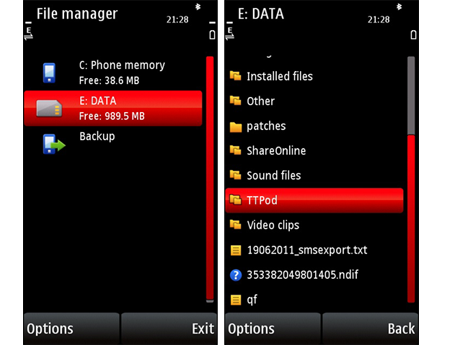
Connect the device to the computer via a USB cable, or can send via bluetooth, First open the file manager or the like, click on the memory card, see in the picture below.


then open the folder "ttpod", the folder "ttpod" you will find a folder "SKIN",
then copy the file extension "TTB" and "XML" into the SKIN folder. now refer to her ttpod application, and apply new skins. see in the picture below.


Friday, March 11, 2011

Settings java applications on symbian phones

What if the java application on symbian phones was not optimal as in this picture. in this tutorial will discuss how to maximize the java applications for symbian phones. for more information please follow the instructions below.


 then please click on the icon on your phone settings, then select the application manager click the application is installed see picture below:


 please find an application that will be set, in this tutorial is my life in network java game, please press options, select the suite settings refer to the image:


after pressing the suite settings will come out like in this picture, you will find the settings on-screen keyboard simply pick off and press ok and finished, now you go back to the game or application.